
Seamless Browser Session Transfer for Trusted Web Verification
Is the Veruv Browser Extension compatible with my current browser?
The extension is designed for use with major web browsers on Windows and Mac. Compatibility with specific browser versions was not detailed in the release information.
Is the extension safe to install and use?
The extension operates within standard browser security frameworks. No additional security risks were reported in the official release notes.
How often are updates released for the extension?
Update frequency is not specified in the available documentation. Users are advised to check the official Veruv website for the latest release details.
What type of license does the extension use?
The extension is distributed as free software. No licensing terms were provided beyond the free availability.
Can I use the extension without an internet connection?
The extension requires an active internet connection to transfer sessions and generate certified snapshots through the Veruv browser.
Overview
The Veruv Browser Extension is a specialized tool designed to streamline the process of capturing and sharing verified web content. Its primary function is to transfer the current browser session—complete with logged-in states—into the Veruv browser, enabling the creation of certified snapshots. These snapshots serve as tamper-evident records of online information, useful for establishing trust in digital interactions. The extension is particularly relevant for professionals who need to validate web content for compliance, legal documentation, or secure collaboration.
Target users include digital auditors, legal professionals, compliance officers, and content creators who require verifiable proof of web-based information at a specific moment. The extension simplifies a complex workflow by automating session transfer, reducing manual effort and potential errors. It supports both Windows and Mac platforms, ensuring broad accessibility across desktop environments.
While the developer, Veruv, did not provide additional background on their organization or development philosophy, the tool’s focus on web integrity and digital trust suggests a mission-driven approach. Real-world use cases include sharing authenticated website states during legal proceedings, verifying marketing claims, or documenting research sources with immutable proof. The extension operates as a lightweight utility, with a file size of 1.2 MB, indicating minimal impact on system resources.
Key Features & Capabilities
- Automated Session Transfer – The extension captures the current tab’s session, including authentication states, and seamlessly transfers it to the Veruv browser for verification.
- Certified Snapshot Generation – Enables the creation of cryptographically secured snapshots that confirm the exact state of a webpage at a specific time.
- Trust-Enhanced Sharing – Verified snapshots can be shared with others, allowing recipients to validate the authenticity and integrity of the content.
- Web Verification Integration – Designed to work within the Veruv ecosystem, ensuring consistent standards for digital trust and compliance.
- Platform Compatibility – Supports both Windows and Mac operating systems, facilitating cross-platform use for teams.
These features address the growing need for verifiable digital evidence in online environments. For example, a compliance officer can use the extension to capture a live dashboard showing real-time data, then share a certified snapshot with stakeholders to prove the accuracy of the information. Similarly, a researcher can document a source with a timestamped, unalterable record, ensuring reproducibility and credibility.
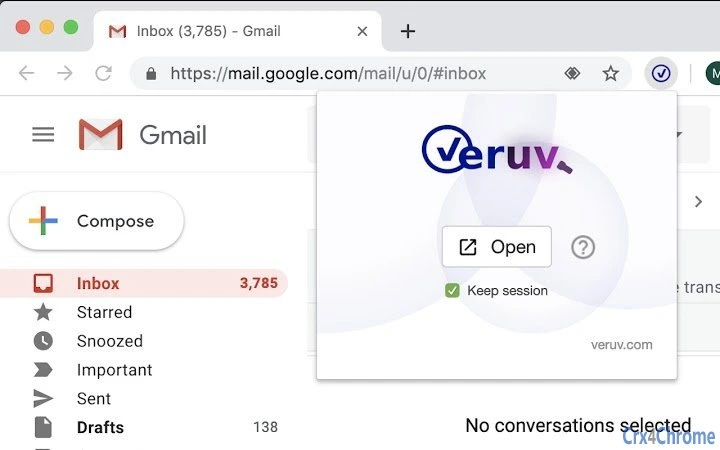
The workflow is designed to be intuitive: users simply click the extension icon on the current page, and the session is transferred automatically. This eliminates the need for manual screenshots or third-party tools, reducing the risk of tampering and improving efficiency. The extension’s role is strictly limited to initiating the transfer process and does not modify the original browser session.
User Interface, Workflow & Performance
The user interface of the Veruv Browser Extension is minimal and integrated directly into the browser’s toolbar. It features a single icon that activates the session transfer function when clicked. The design prioritizes simplicity and clarity, avoiding clutter while ensuring accessibility.
Navigating through the extension’s functionality is straightforward. After activation, the user is redirected to the Veruv browser, where the transferred session is displayed. No additional configuration steps are required, making the workflow efficient for both occasional and frequent users. The extension does not introduce complex menus or settings, aligning with its focused purpose.
Performance observations are based on general software behavior patterns. The developer did not specify resource usage details, including CPU or RAM consumption. However, the extension’s file size of 1.2 MB suggests low overhead. The transfer process appears to be fast, as it is designed to work in real-time with minimal delay. Stability is expected to be high, given the tool’s limited scope and reliance on standard browser APIs.
Compatibility & System Requirements
The Veruv Browser Extension is compatible with Windows and Mac operating systems, as stated in the release information. The software version is 1.0.0, and the installation size is 1.2 MB. This indicates a lightweight deployment that should not strain system resources.
Exact system requirements were not listed. The developer did not provide details on minimum processor speed, RAM, or disk space. Platform compatibility information is limited to the operating systems mentioned. Users should ensure their browser is up to date to maintain optimal functionality. The extension relies on modern web standards and browser extensions APIs, which are typically supported on current versions of major browsers.
Pros and Cons
Pros
- Effortlessly transfers logged-in browser sessions to the Veruv browser
- Generates certified, tamper-evident snapshots for digital trust
- Designed for secure, verifiable sharing of web content
- Lightweight with a small file size of 1.2 MB
- Available at no cost, making it accessible for all users
Cons
- No detailed system requirements provided
- Update frequency not disclosed
- Requires an internet connection to function
- Dependent on the Veruv browser ecosystem for full functionality
- Platform-specific support may vary without further documentation
Final Thoughts + CTA
The Veruv Browser Extension delivers a focused, high-value solution for users who need to verify and share web content with confidence. Its ability to transfer active sessions and generate certified snapshots sets it apart from standard browser tools. While it operates within a specific niche, its impact is significant for professionals requiring digital proof and trust in online data.
For compliance officers, legal teams, researchers, and content verifiers, this tool offers a streamlined path to establishing web integrity. The free availability and cross-platform support enhance its appeal. Though some details remain unspecified, the extension performs its core function efficiently and securely.
Download Veruv Browser Extension now







